Generating an aerial view of your project with OpenRewrite
Generating an aerial view of your project with OpenRewrite
Discover how to use the OpenRewrite scanning recipes to generate an architectural view of your project.
openrewrite (4 Parts Series)
In the previous article, we discussed (well, I wrote, you read) Scanning Recipes when you need complete information to make a decision, or to generate code ex nihilo.
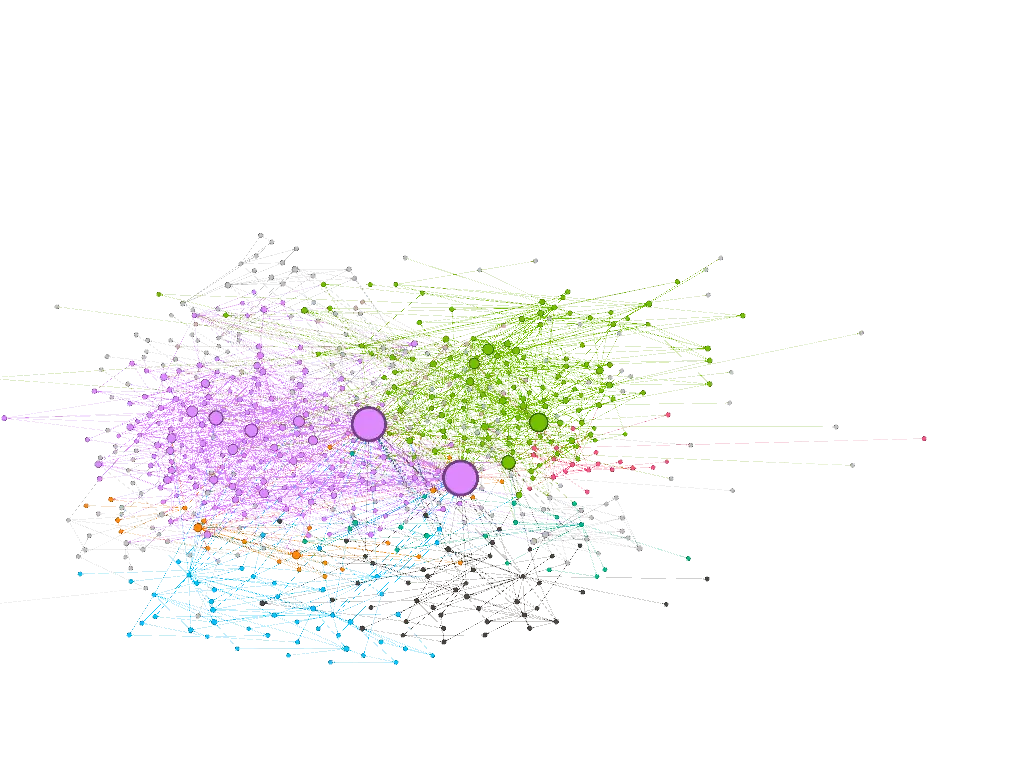
I promised you a little toy at the end… The time has come for the reveal: the Project Graph Generator.

The Need: Mapping Your Code
It’s sometimes difficult to get a global view of the dependencies within your own code. Is this package too tightly coupled to others? What is the central class of my domain? Has my wonderful initial design withstood the ravages of time?
Since OpenRewrite already knows how to build the complete LST of your codebase, it’s not exactly complicated to traverse it to deduce relationships.
This is exactly the goal of the project-graph-generator project: scanning your sources to deduce a dependency graph and produce a simple HTML page using D3.js to display it.
TL;DR;
Oh thou, who doesn’t want to know more, but only wants to play with the graph, go no further than this chapter, you might gain some knowledge!
The project is easily usable via the rewrite-maven-plugin or any other way to trigger an OpenRewrite recipe. Here is the command to launch a complete analysis of your project:
mvn -U org.openrewrite.maven:rewrite-maven-plugin:run \
-Drewrite.recipeArtifactCoordinates=io.github.jtama:project-graph-generator:RELEASE \ (1)
-Drewrite.activeRecipes=io.github.jtama.openrewrite.ProjectAerialViewGenerator \
-Drewrite.exportDatatables=true| 1 | RELEASE = latest |
Once the analysis is complete, the plugin generates a standalone HTML file containing the data AND the visualization. Simply open the class-diagram.html file at the root of your project in your browser to explore the web of your architecture.
You can also pass additional options to filter the nodes according to your needs:
maxNodes=20
|
Filters for classes with the highest number of incoming connections. |
basePackages=com.mycompany
|
Forces the target base package |
includeTests=true
|
Also include test classes. |
To learn more 👉 Here is the project repository. Go ahead, it’s open source, use it, fork it, make issues and pull requests!

The Mechanics: Analysis Without Modification
Under the hood, the tool is based on the ScanningRecipe concept we saw previously. The major difference here is that the generation phase generates HTML, and the modification phase (visit) does nothing, nada, zilch. The entire goal of the recipe is concentrated in the first pass: scanning the LST. Well, no, not the goal, rather the intelligence (not the A.I. kind).
It all starts with an accumulator - our famous graph - which will store the classes (Nodes) and their relationships (Links) as the scan progresses:
public static class GraphScanAccumulator {
    public List<Node> nodes = new ArrayList<>(); (1)
    public List<Link> links = new ArrayList<>();

    // ... search methods findNode() and findLink()
}| 1 | Did you seriously think I was going to explain this line? |
To fill this graph, we will traverse the LST using a JavaIsoVisitor.
First, we identify each component of our architecture by overriding the visitClassDeclaration method. Each new class encountered becomes a "Node":
@Override
public J.ClassDeclaration visitClassDeclaration(J.ClassDeclaration classDecl, ExecutionContext ctx) {
    if (includeTests() || not(isTestClass()).test(getCursor())) { (1)

        if (classDecl.getType() != null) {
            String fqn = classDecl.getType().getFullyQualifiedName();
            graph.findNode(fqn).orElseGet(() -> { (2)
                Node newNode = new Node(fqn, classDecl.getType().getPackageName());
                graph.nodes.add(newNode);
                return newNode;
            });
        }
        return super.visitClassDeclaration(classDecl, ctx); (3)
    }
    return classDecl;
}| 1 | We only look at test classes if explicitly requested. |
| 2 | We use our graph accumulator to register the current class if it hasn’t been seen already. |
| 3 | We don’t forget to call super so that the visitor continues to descend into the tree.If and only if the class is of interest to us, otherwise, we don’t waste our time. |
Next, we must weave the web. How do we know that class A depends on class B? We simply capture type usages (method calls, fields access, instantiations). For example, here’s how we proceed for method invocations:
@Override
public J.MethodInvocation visitMethodInvocation(J.MethodInvocation method, ExecutionContext ctx) {
    var mi = super.visitMethodInvocation(method, ctx); (1)

    JavaType.FullyQualified targetType = mi.getMethodType() != null ? mi.getMethodType().getDeclaringType() : null; (2)

    if (targetType != null) {
        addLink(targetType); (3)
    }
    return mi;
}| 1 | Let the visitor visit. |
| 2 | Extract the type information (JavaType) carried by the invoked method to know which class it belongs to. The type can be null, particularly if OpenRewrite failed to determine it. |
| 3 | Invoke the addLink method. |
The addLink method contains all the logic allowing us to determine if the targetType interests us, that is to say if it is part of the target packages. If so, we create a new link or strengthen an existing one.
The same logic is obviously applied to member references, class fields, constructor invocations, etc.
This is the beauty of OpenRewrite’s model: the LST is already perfectly typed by the compiler during parsing. We don’t need to guess who an invoked method belongs to, the type information tells us with certainty.
Going Further: Raw Export with Datatables
Generating an HTML page is nice. But what if you want to cross-reference this data, render it yourself in a tool like Gephi, or even provide it as context to an LLM to audit your architecture?
This is where OpenRewrite’s Datatables come in. In addition to the view, project-graph-generator can export metadata in the form of easily usable CSV files:
target/rewrite/datatables/io.github.jtama.openrewrite.model.NodesReport.csv-
Contains all the classes found with their package and their number of incoming/outgoing connections.
target/rewrite/datatables/io.github.jtama.openrewrite.model.LinksReport.csv-
Exhaustive list of links between classes with an associated weight.
target/rewrite/datatables/io.github.jtama.openrewrite.model.JavaSourceFileExcludedReport.csv-
All classes that were excluded from the final result (often due to package filtering).
Now, it’s your turn. Run the scanner on your legacy, and contemplate (or be frightened by) the extent of the web!
P.S.: As you may have noticed, this plugin is distributed on Maven Central (io.github.jtama:project-graph-generator). If you’re wondering how to easily automate the entire publication chain without tearing your hair out, I recommend you take a look at my JReleaser tutorial.

Jérôme Tama
Techlead/Architecte/Compagnon du devoir