TamboUI, pronounced tambouille, excuse my French
TamboUI, pronounced tambouille, excuse my French
TamboUI, a Java framework for building modern TUIs: what you absolutely need to know about state and event handling, through a real little tool.
|
This post has been translated using AI. I reviewed it, but if you don’t want AI content, read the french version. |
A bit over a year ago, I gave you a trick to find out where a Maven dependency’s version comes from: a good old mvn help:effective-pom -Dverbose=true, followed by a grep.
It works, but it’s a bit rough — it crunches under your teeth like a sandwich at the beach. And in 2026, if you can’t deliver a bit of WAHOO, 💀.
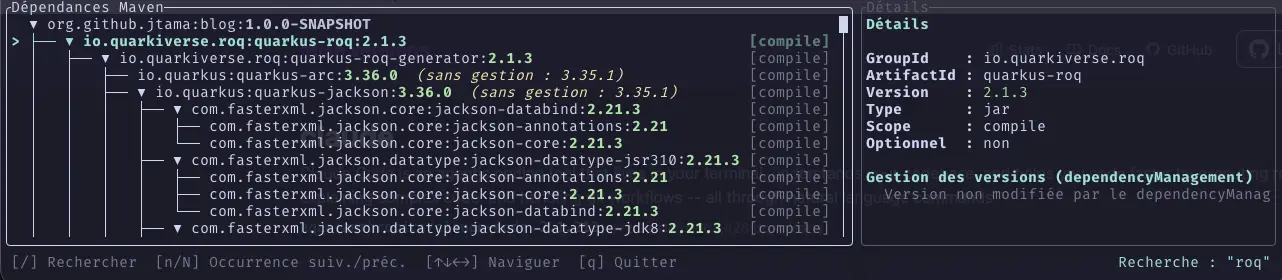
So this time, I did things properly: a real tool, with a dynamic tree view, a search and a detail panel. In Java. In a terminal. Special shoutout to Thierry Chantier.
There you go, that’s your pretext — a Maven dependency explorer. The real subject is TamboUI.

A quick word on how we get the project data, and then we move on
The explored project’s data comes from MIMA, a great library that embeds Maven’s dependency resolver (Aether) and its effective-POM computation engine, without ever spawning an mvn subprocess.
It’s pure Java, it’s fast, it’s made by the folks behind Maveniverse (no but seriously, doesn’t that name slap?) who probably deserve their own article one day.
One day.
All you need to remember is that I can get a dependency tree (the structure of dependency:tree) and the effective POM (the equivalent of help:effective-pom) for a project — both in memory, without having to launch a process and take a wild guess at parsing its outcome on stdio.
The rest of the article only talks about what we do with that on screen.
TamboUI in a nutshell
TamboUI is a Java library for building TUIs (Terminal User Interfaces), very openly inspired by ratatui (its Rust counterpart).
It offers three levels of usage:
| Immediate Mode |
For the hardcore folks who want absolute control. You drive the terminal and the event loop yourself. |
| TuiRunner |
The loop is managed for you, and you handle events through callbacks. |
| DSL Toolkit |
a declarative layer on top, where each element manages its own state. It’s the shortest path, and it’s the one used in this article. |
|
Whatever happens, the fwk gives you a widget library, layout primitives (which look a lot like an html table), and styling with an experience very close to CSS (and that’s a good thing, in any doubt). You also get, as a bonus, automatic adaptation to the terminal size, even on resizing. |
The doc’s "Hello World" fits in a handful of lines:
public class HelloTamboUI extends ToolkitApp {
    @Override
    protected Element render() {
        return panel("Hello",
            text("Welcome to TamboUI!").bold().cyan(),
            spacer(),
            text("Press 'q' to quit").dim()
        ).rounded();
    }
}
You can see everything: the widgets, the declarative approach, the css styling.
Point of attention: the render() method is called back on every frame (careful with heavy computations there), and returns the description of what should be displayed right now. Keep that sentence in your back pocket, we’ll need it.
For more than two words: the docs are really good !!
Building the tree: model / view separation
TamboUI’s good design choice here: its TreeElement<T> widget cleanly separates data from its representation. On one side, a record that knows nothing about rendering:
record DependencyInfo(
        String groupId,
        String artifactId,
        String version,
        String extension,
        String classifier,
        String scope,
        boolean optional,
        String premanagedVersion, (1)
        String premanagedScope,
        String managedByModelId, (2)
        int managedByLine) {

    boolean versionManaged() {
        return premanagedVersion != null && !premanagedVersion.equals(version);
    }
}| 1 | The version the dependency would have had without dependencyManagement. Aether computes it for you, free of charge. |
| 2 | Where the winning version comes from — we’ll get back to it later, promise. |
On the other side, a nodeRenderer that decides how each node gets displayed, completely independent from the resolution logic:
this.tree = tree(root)
        .title("Maven Dependencies")
        .rounded()
        .highlightColor(Color.CYAN)
        .scrollbar()
        .guideStyle(GuideStyle.UNICODE)
        .nodeRenderer(MvnDepsView::renderNode);
private static StyledElement<?> renderNode(TreeNode<DependencyInfo> node) {
DependencyInfo info = node.data();
List<Element> parts = new ArrayList<>();
parts.add(text(info.groupId() + ":" + info.artifactId() + ":").fit());
parts.add(text(info.version()).fg(scopeColor(info.scope())).bold().fit()); (1)
if (info.versionManaged()) {
parts.add(text(" (unmanaged: " + info.premanagedVersion() + ")").yellow().italic().fit()); (2)
}
parts.add(spacer());
// ... scope, "optional" badge
return row(parts.toArray(new Element[0]));
}| 1 | Color by scope (green for compile, cyan for provided, magenta for test…). #CSS |
| 2 | The little visual clue: if this line shows up, some dependencyManagement has stuck its nose into your business. |
Nothing exotic so far. And that’s exactly the beauty of this FWK: you get to something that looks good, very quickly.
State management: the part I always trip on
Reminder: there are no signals, no observables, no useState or any such delights. The render() method is called in a loop and simply re-reads the object’s fields as they stand at that exact instant.
- Upside
-
A whole category of bugs disappears at once — "I forgot to notify the change" doesn’t exist here, nobody’s listening to anything.
- Downside
-
And this one we didn’t see coming: state only survives from one frame to the next if it’s the same object being redrawn. Look at this
main():
MvnDepsView view = new MvnDepsView(root);
try (ToolkitRunner runner = ToolkitRunner.builder().build()) {
    runner.eventRouter().addGlobalHandler(searchHandler);
    runner.run(() -> view); (1)
}| 1 | The lambda captures view, not new MvnDepsView(root). |
If you replace the capture with a constructor call, everything compiles just fine, the app runs just fine, and your selection resets to zero on every single frame. No error, no warning.
Just a tree that stubbornly refuses to remember where you were.
MvnDepsView therefore carries its application state (search mode, active query) as plain instance fields — no imposed container, no store, no dispatch:
private boolean searchMode = false;
private String activeQuery;
And what about selection within the tree itself? Nothing to do, TreeElement handles it internally, all grown up on its own — unlike the low-level ListWidget widget, which demands an external ListState you have to pass around everywhere.
A rule of thumb emerges: state lives wherever the responsibility for it lives, and TamboUI rarely lets you choose to put it anywhere else.
Event handling: the real story
Across my various experiences with TamboUI, this is the part that caught me off guard the most, and the most consistently.
TreeElement comes with its own ready-made keyboard shortcuts:
-
↑, ↓ Obvious.
-
→ Expands the node or moves to the first child.
-
← Collapses the node or moves to the parent.
-
↵, Space to fold/unfold a node.
-
etc.
Handy. But not enough for my use case. I wanted a vim-style search:
I went through the demos, found the one that best matched what I wanted to do, and went and read the code. And yes, I do read the code.
And what do I see?
Main view implementing Element directly for proper event handling.
Mkay, if that’s how it’s done, fine, let’s do it.
A root Element that handles the event, handles search mode, and delegates the rest to the tree.
It almost works. The search opens, you can type a query… and pressing ↵ obviously folds or unfolds a tree node instead of confirming anything.
Honestly, it’s almost a miracle that opening the search field worked at all.
The beauty of open source is that if you want to understand, all you have to do is read.
Off to the source code of ToolkitRunner and its EventRouter. Two details that aren’t obvious on a first read of the docs:
-
Registration order
// ToolkitRunner.run(...)
Element root = elementSupplier.get();
if (root != null) {
    root.render(frame, frame.area(), renderContext);
    renderContext.registerElement(root, frame.area()); (1)
}
1 The root element only gets registered with the event router after its entire subtree has finished rendering. In other words: treehas long since registered itself by the timeMvnDepsViewfinally signs up, last on the list. -
Am I paying attention? Does it even matter?
// TreeElement.handleKeyEvent(...)
public EventResult handleKeyEvent(KeyEvent event, boolean focused) {
    EventResult result = super.handleKeyEvent(event, focused);
    if (result.isHandled()) {
        return result;
    }
    if (lastFlatEntries.isEmpty()) {
        return EventResult.UNHANDLED;
    }
    if (event.matches(Actions.MOVE_UP)) { /* ... */ } (1)
    // Enter, arrows... all handled here, regardless of `focused`
}
1 focusedis received as a parameter… and never consulted again afterwards.TreeElementprocesses ALL of its inputs whether or not it has focus in the framework’s sense.
Put it all together: my root Element was registered last, and the tree processed ↵ without caring who had "focus".
There simply wasn’t a single scenario where my code ran before the event is handled.
The only code that runs before the normal element traversal is a global handler:
GlobalEventHandler searchHandler = event ->
        event instanceof KeyEvent ke ? view.handleGlobalKey(ke) : EventResult.UNHANDLED;
runner.eventRouter().addGlobalHandler(searchHandler); (1)
runner.run(() -> view);| 1 | Registered once, before run(). |
All the search logic therefore moved from a handleKeyEvent(Element) (never consulted in time) to a handleGlobalKey method called from this handler.
EventResult handleGlobalKey(KeyEvent event) {
    if (searchMode) {
        if (event.isCancel()) { searchMode = false; return EventResult.HANDLED; }
        if (event.isConfirm()) {
            searchMode = false;
            activeQuery = searchState.text();
            jumpToMatch(activeQuery, true);
            return EventResult.HANDLED; (1)
        }
        handleTextInputKey(searchState, event); (2)
        return EventResult.HANDLED;
    }
    if (event.isChar('/')) { searchMode = true; searchState.clear(); return EventResult.HANDLED; }
    // n / N for next / previous occurrence
    return EventResult.UNHANDLED; (3)
}| 1 | ↵ in search mode is finally handled before the tree gets to have its say. |
| 2 | Toolkit.handleTextInputKey(…): we delegate input handling to the framework. |
| 3 | And most importantly: we return UNHANDLED for everything else. The tree therefore keeps receiving its events normally, a bit further down the router’s traversal. |
The moral, if there’s only one thing you should take away from this article: a custom root Element is great for composing your layout. But the moment you assemble a widget that already has its own keyboard bindings — a Tree, a List, a TextInput — you have to go through global handlers if you want any hope of getting ahead of it. It’s written nowhere in bold in the docs. It is now.
Back to square one
Remember the grep from the beginning.
It told me that the version had changed, and who had decided it. But I’d lose the dependency tree that led me to that who.
This time, the detail panel answers the question directly:
InputLocation location = managed.getLocation("version"); (1)
managedByLine = location.getLineNumber();
managedByModelId = location.getSource() != null ? location.getSource().getModelId() : null;| 1 | Maven tracks, for every field of every model it merges (parent, imported BOM, current project), its exact source — the very same mechanism that feeds the <!-- …, line N -→ comments from help:effective-pom -Dverbose. Except here, no need to scroll through a twelve-thousand-line pom.xml: it’s displayed right there, in the panel, next to the node in question. |
quarkus-arc, for instance: Managed by: io.quarkus:quarkus-bom:3.36.0, line 3266. The grep, but pretty.
And is it easy to use?
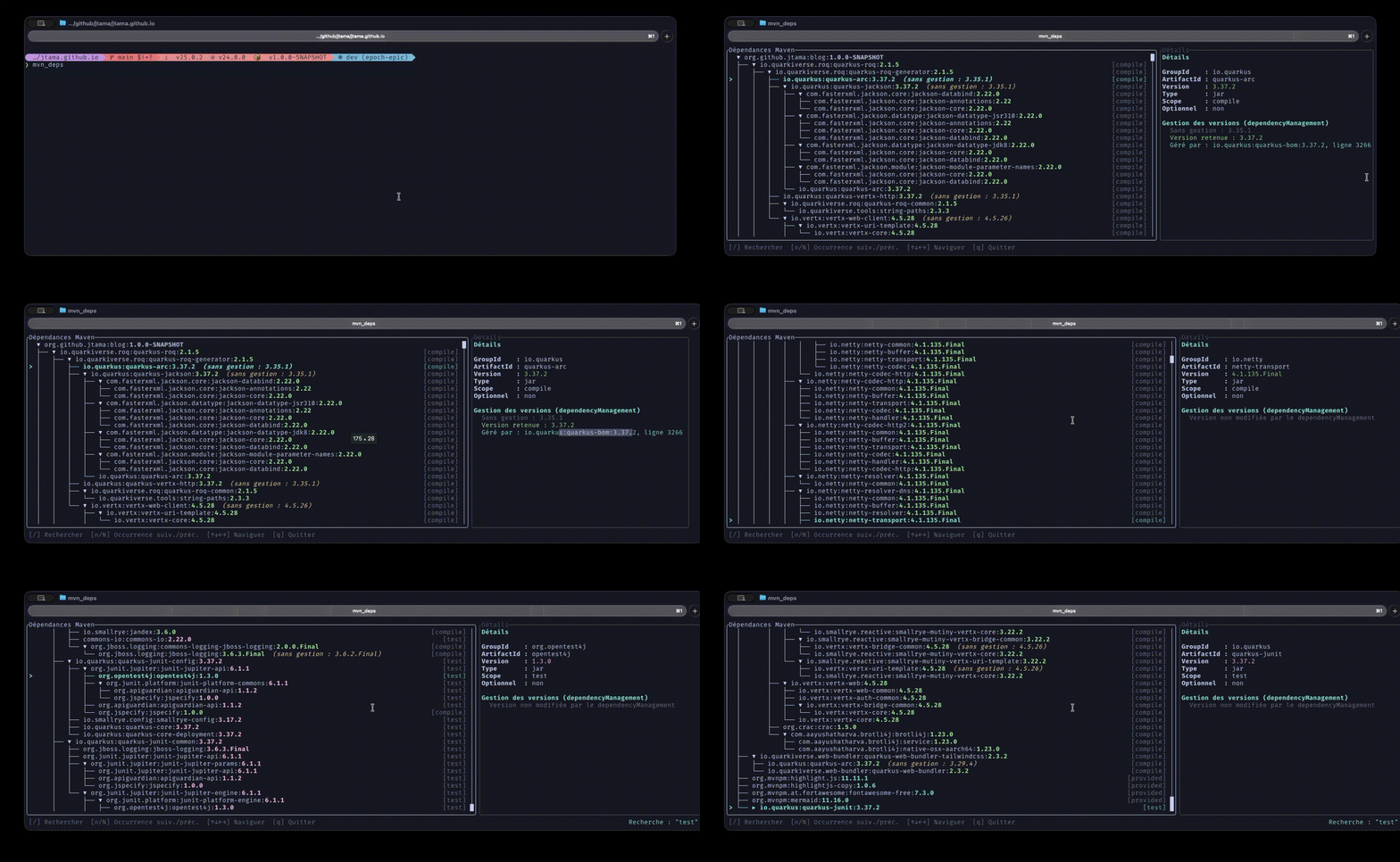
Since I’m not a slob, I did things properly. Or, to give credit where credit is due: Max Andersen did things properly.
All the code is available as a jbang script. So:
-
Download the file: MvnDepsTui.java
-
jbang app install --name mvn_deps MvnDepsTui.java -
Go to the root of any Maven project and run the
mvn_depscommand
Conclusion
Two things to take away:
-
Even as a young FWK, TamboUI is well thought out, with a clear, easy-to-pick-up API.
-
State and event handling remains something you need to pay attention to, especially if you decide to use ready-made Widgets.
Resources
-
TamboUI on GitHub — and its docs at tamboui.dev
-
MIMA — for those still intrigued by pure-Java Maven
-
The 2025 article — the
greptrick that started it all -
MvnDepsTui.java — the full source.

Jérôme Tama
Techlead/Architecte/Compagnon du devoir