
Release everything with JReleaser
The quick and effortless way to release your project!
Java, Go, Node, Rust, Zig, Swift, Perl, Python, C/C++, C#, Elixir, Haskell, Ruby, Crystal, and more.
JReleaser is a tool that performs the most common steps related to releasing your application.
Releasing is not just about publishing a package to an artifact repository. It could also mean signing and generating artifacts, assembling and publishing a changelog, announcing the release on your favorite hub, and even making some noise about it through mail, Zulip, or whatever you want.
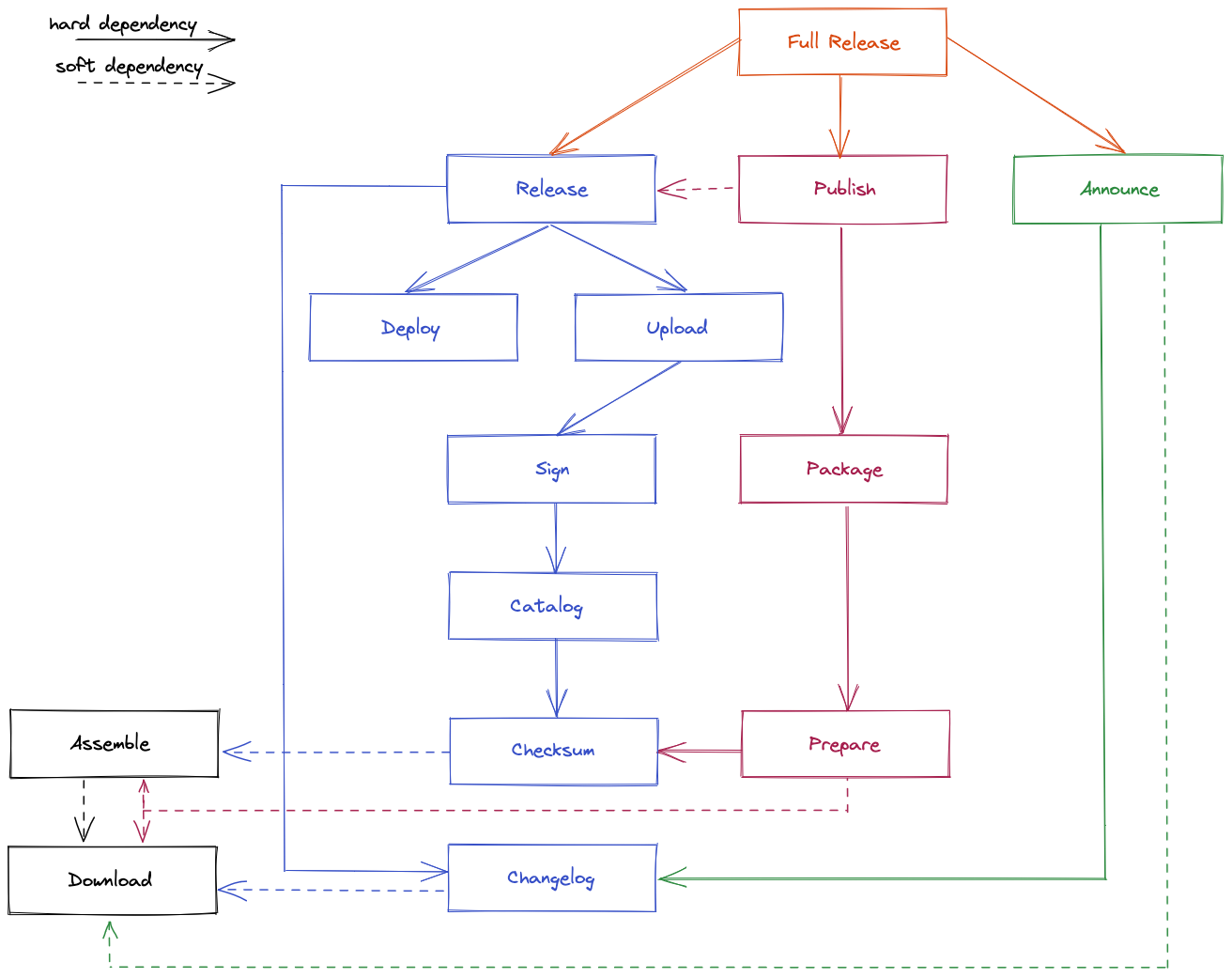
In this post, we will focus on releasing a Java application.
Wait, it’s not just Maven 🫘!
Each packager, each artifact repository has its own specificity.
As Maven Central is the ultimate goal for Java developers, and as it’s also one of the most complicated repositories, this is the one we will be looking at in this blog post. But of course, once you’ve done that, everything else will be a piece of cake 🧁!
Pre-requisite (tools ⚒️ and credentials 🔐)
PGP
Generate your PGP key pair
gpg --generate-keyThat will prompt the following
We need to generate a lot of random bytes. It is a good idea to perform
some other action (type on the keyboard, move the mouse, utilize the
disks) during the prime generation; this gives the random number
generator a better chance to gain enough entropy.
We need to generate a lot of random bytes. It is a good idea to perform
some other action (type on the keyboard, move the mouse, utilize the
disks) during the prime generation; this gives the random number
generator a better chance to gain enough entropy.
gpg: /root/.gnupg/trustdb.gpg: trustdb created
gpg: directory '/root/.gnupg/openpgp-revocs.d' created
gpg: revocation certificate stored as '/root/.gnupg/openpgp-revocs.d/4C2428BC373276273A30B9D4FA30C263300AD893.rev'
public and secret key created and signed.

pub   ed25519 2025-11-18 [SC] [expires: 2028-11-17]
      4C2428BC373276273A30B9D4FA30C263300AD893(1)
uid                      Guess who's back ? <back_again@shady.com>
sub cv25519 2025-11-18 [E] [expires: 2028-11-17]| 1 | This is your key identifier; keep it somewhere. |
You’ll be asked for a passphrase to protect your keypair. Choose wisely, and don’t tell anyone
🤫chhhhhht!
❤️ Eminem<3<3
If you forget to save your key identifier, you can find it back using
list-keys command
# gpg --list-keys
/root/.gnupg/pubring.kbx
------------------------
pub   ed25519 2025-11-18 [SC] [expires: 2028-11-17]
      4C2428BC373276273A30B9D4FA30C263300AD893
uid           [ultimate] Guess who's back ? <back_again@shady.com>
sub   cv25519 2025-11-18 [E] [expires: 2028-11-17]
Distribute it
There are sereval public keyservers and amongst them the following are supported keyserver.ubuntu.com, keys.openpgp.org, pgp.mit.edu.
The following command will make your key publicly available :
gpg --keyserver keyserver.ubuntu.com -send-key 4C2428BC373276273A30B9D4FA30C263300AD893(1)| 1 | Replace with your own key |
Obtaining your maven central credentials.
Login to maven central, click on the top right menu item "View User Tokens", and generate a new token.
You can specify its name and expiration date. Personally, I chose to go crazy for this :

Install JReleaser
There are many ways to install JReleaser, but my goto for local environment is to use JBang :
// Download, and install localy
jbang app install jreleaser@jreleaser

// Execute by using
jreleaser <command> [<args>]
If you prefere to run it without installing it, you can also use JBang :
// Download, cache, and run
jbang jreleaser@jreleaser <command> [<args>]
Verify your project descriptor
Even though JReleaser will do it for you, you can always independently verify if your project descriptor has all the mandatory fields to be published by running :
jbang pomchecker@kordamp check-maven-centralPlease correct your descriptor accordingly and repeat the operation until everything is clean
Configure your project
This is a 2 steps process. You need to configure JReleaser but also your build process to generate all the necessary artefacts for publication.
The Maven configuration
Add a release profile to your pom.xml :
release profile
<profile>
    <id>release</id>
    <properties>
        <altDeploymentRepository>
            local::file:./target/staging-deploy (1)
        </altDeploymentRepository>
    </properties>
    <build>
        <defaultGoal>deploy</defaultGoal>
        <plugins>
            <plugin>
                <groupId>org.apache.maven.plugins</groupId>
                <artifactId>maven-javadoc-plugin</artifactId>
                <executions>
                    <execution>
                        <id>attach-javadocs</id>
                        <goals>
                            <goal>jar</goal>
                        </goals>
                        <configuration>
                            <attach>true</attach>
                        </configuration>
                    </execution>
                </executions>
            </plugin>
            <plugin>
                <groupId>org.apache.maven.plugins</groupId>
                <artifactId>maven-source-plugin</artifactId>
                <executions>
                    <execution>
                        <id>attach-sources</id>
                        <goals>
                            <goal>jar</goal>
                        </goals>
                        <configuration>
                            <attach>true</attach>
                        </configuration>
                    </execution>
                </executions>
            </plugin>
        </plugins>
    </build>
</profile>The Gradle configuration
If you do use Gradle, I’m sure you know how to produce the equivalent configuration. I don’t.
The JReleaser configuration
You can initialize your project configuration with the following command :
jbang jreleaser@jreleaser initThis will generate your project configuration file that you will have to amend following your needs.
jreleaser.yaml
# Generated with JReleaser 1.21.0 at 2025-11-19T09:09:25.55515446Z
project:
  name: app
  version: 1.0.0-SNAPSHOT
  description: Awesome App
  longDescription: Awesome App
  authors:
    - Duke
  license: Apache-2.0
  links:
    homepage: https://acme.com/app
  languages:
    java:
      groupId: com.acme
      version: 8
  inceptionYear: 2025

release:
  github:
    owner: duke

distributions:
  app:
    artifacts:
      - path: path/to/{{distributionName}}-{{projectVersion}}.zip
The distributions and github can be removed if you only want maven deployment, anyway you have to specify the maven deployment configuration by adding the following to your config file :
signing: (1)
  active: ALWAYS
  armored: true

deploy: (2)
  maven:
    mavenCentral:
      release-deploy:
        active: RELEASE
        url: https://central.sonatype.com/api/v1/publisher
        stagingRepositories:
          - target/staging-deploy (3)
    nexus2:
      snapshot-deploy:
        active: SNAPSHOT
        snapshotUrl: https://central.sonatype.com/repository/maven-snapshots/
        applyMavenCentralRules: true
        snapshotSupported: true
        closeRepository: true
        releaseRepository: true
        stagingRepositories:
- target/staging-deploy (3)| 1 | Lets JRelease do the artefact signing for you |
| 2 | Which maven repository to use for release and snapshot deployments |
| 3 | Where to find the artefacts locally. Must match the value used in your project configuration. |
You will have to specify a few secret variables, but for obvious security reasons, NOT in a versioned source file…
Specifying variables
Most of the JReleaser needed credentials are gonna be common for all your project. So setting them globally for JReleaser is a good thing to do. I set them in the JReleaser defaut folder. By default $HOME/.jreleaser/config.properties (accepted formats are PROPERTIES, YAML, TOML and JSON)
I choose TOML and here what my file looks like :
JRELEASER_GPG_PUBLIC_KEY = """-----BEGIN PGP PUBLIC KEY BLOCK-----

<place_your_public_key_here>
-----END PGP PUBLIC KEY BLOCK-----""" (1)
JRELEASER_GPG_SECRET_KEY = """-----BEGIN PGP PRIVATE KEY BLOCK-----

<place_your_secret_key_here>
-----END PGP PRIVATE KEY BLOCK-----"""

JRELEASER_DRAFT = true (2)
JRELEASER_GPG_PASSPHRASE = "❤️ Eminem<3<3"
JRELEASER_MAVENCENTRAL_RELEASE_DEPLOY_USERNAME = "redacted"
JRELEASER_MAVENCENTRAL_RELEASE_DEPLOY_TOKEN = "redacted"
JRELEASER_NEXUS2_SNAPSHOT_DEPLOY_USERNAME = "redacted"
JRELEASER_NEXUS2_SNAPSHOT_DEPLOY_TOKEN = "redacted" (3)| 1 | Toml supports multiline string using triple double quotes: """ |
| 2 | I only do draft release from local env |
| 3 | Values obtained in Obtaining your maven central credentials. chapter. They are the same for maven central and nexus2_snapshot |
One more thing, please. I prefere to only do dry run execution locally but that cannot be specified through file at the moment, so I export the value just before running the commands :
export JRELEASER_DRY_RUN=true && jreleaser full-releaseOnce you’re happy, you can possibly unset the dry run property and relaunch, but I’d rather do the proper release from my CI, which is Github  at the moment.
Running all this from Github 
Here is the minimal github workflow to release a maven application.
name: Release
on:
  workflow_dispatch: (1)
    inputs:
      version: (2)
        description: "Release version"
        required: true

jobs:
  build:
    needs: [ precheck ]
    name: 'Build artefacts'
    runs-on: ubuntu-latest
    steps:
      - name: 'Check out repository'
        uses: actions/checkout@v4
        with:
          ref: ${{ needs.precheck.outputs.HEAD }}
      - name: 'Set up Java'
        uses: actions/setup-java@v4
        with:
          distribution: temurin
          java-version: 21
          cache: 'maven'
      - name: 'Build artefacts'
        run: mvn -B -P release clean deploy
      - name: Deploy to Central
        uses: jreleaser/release-action@v2 (3)
        with:
          version: latest
          arguments: 'full-release' (4)
        env:
          JRELEASER_GPG_PUBLIC_KEY: ${{ secrets.GPG_PUBLIC_KEY }}
          JRELEASER_GPG_SECRET_KEY: ${{ secrets.GPG_PRIVATE_KEY }}
          JRELEASER_GPG_PASSPHRASE: ${{ secrets.GPG_PASSPHRASE }}
          JRELEASER_MAVENCENTRAL_USERNAME: ${{ secrets.SONATYPE_USERNAME }}
          JRELEASER_MAVENCENTRAL_PASSWORD: ${{ secrets.SONATYPE_PASSWORD }}
          JRELEASER_NEXUS2_USERNAME: ${{ secrets.SONATYPE_USERNAME }}
          JRELEASER_NEXUS2_TOKEN: ${{ secrets.SONATYPE_PASSWORD }} (5)
          JRELEASER_PROJECT_VERSION: ${{ github.event.inputs.version }} (2)
#JRELEASER_DRAFT: true (6)| 1 | Manually triggered workflow |
| 2 | The version to be released. It could also be retrieved from your maven project. |
| 3 | Uses the JReleaser github action (Integration also exists with Gitlab, Gitea and many others) |
| 4 | Runs the full-release workflow |
| 5 | All the values to be assign in your project secrets |
| 6 | Wether or not do you want draft releases. |
Wrap up
We’ve only scratch the surface of what can be done with JReleaser. If you want a really full example, here’s how JReleaser releases itself, with JReleaser of course.
But at least you know how to publish your artefacts to Maven Central 🗻 \o/ .